Problem Description
When you try to start a Receive Location or the entire application from BizTalk360, you may encounter an error similar to the following:
Error-1: Could not validate TransportTypeData
Microsoft.BizTalk.ExplorerOM.BtsException: Could not validate TransportTypeData, Address or Public Address properties for Receive Location 'BatchControlMessageRecvLoc'. Invalid query at Microsoft.BizTalk.ExplorerOM.BtsCatalogExplorer.SaveChangesWithTransaction(Object transactionObj))
Cause
This issue occurs due to a restriction in BizTalk ExplorerOM when it is executed in a 64-bit application process.
Solution
To resolve the issue, configure the BizTalk360 IIS Application Pool to run in 32-bit mode.
Follow these steps:
Open IIS Manager.
Navigate to Application Pools.
Locate the BizTalk360 Application Pool.
Right-click the application pool and select Advanced Settings.
Under General, locate Enable 32-Bit Applications.
Set Enable 32-Bit Applications to True.
Click OK.
Restart the BizTalk360 Application Pool.
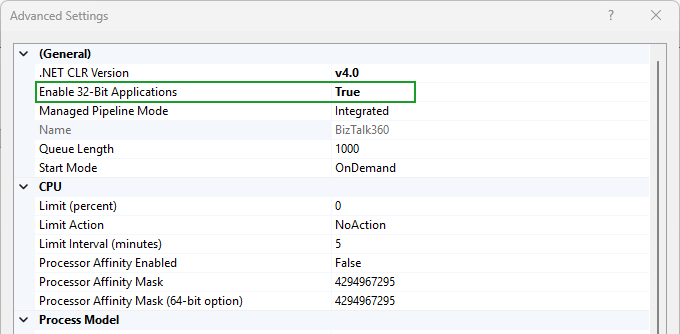
Once the application pool is running in 32-bit mode, try starting the Receive Location or the application again from BizTalk360.
Error-2: Failed to create ' ' Transport Component
Microsoft.BizTalk.ExplorerOM.BtsException: Failed to create 'MQSC' Transport Component at microsoft.BizTalk.ExplorerOM.BtsCatalogExplorer.SaveChangesWithTransaction(Object transactionObj) at A.c5f8fe3d3ca28e5f96934744e075c6532.cf363711a3758a68242162aa434e00a35(ReceiveLocationCollection c8089c26347d4d0c5d5b248deacbe158a, ReceiveLocationOperation c5643bd14c28f2f75e668b81c80acad00) at Kovai.BizTalk360.BusinessService.Main.BizTalkApplicationBusinessService.ChangeReceiveLocationStatus(ReceiveLocationCollection receiveLocations, ReceiveLocationOperation operation) at Kovai.BizTalk360.BusinessService.Main.Rest.BizTalkApplicationBusinessService.ChangeReceiveLocationStatus(BizTalkEnvironmentSetting environment, String applicationName, ReceiveLocationCollection receiveLocations, ReceiveLocationOperation operation) at Kovai.BizTalk360.WCFService.REST.BizTalkApplicationService.ChangeReceiveLocationStatus(ChangeReceiveLocationStatusRequest request)
Cause of the problem
This issue occurs when you use any third-party adapter and BizTalk360 is running on a standalone server.
Solution for the problem
To solve this problem, install the third-party adapter where BizTalk360 is installed and restart the Monitoring Service.
Error-3: Error Type: Failed to create 'WCF-SQL' Transport Component
Cause of the problem
This error will occur more likely when you have installed BizTalk360 on a stand-alone server.
Solution for the problem
To resolve this issue, install the BizTalk Enterprise Adapter pack (in this case, the WCF-SQL adapter) on the server where BizTalk360 is installed.
You will face a similar issue for other enterprise adapters like WCF-Oracle. So, if you are using any of the enterprise adapters, please install them on the server where you have installed BizTalk360.
You can also read this blog post: BizTalk Admin only installation bug: Failed to create WCF-SQL Transport Component, which helps to address this issue.