Release Date: 30th January 2026 .png)
 New features
Customized Data Monitoring Schedule
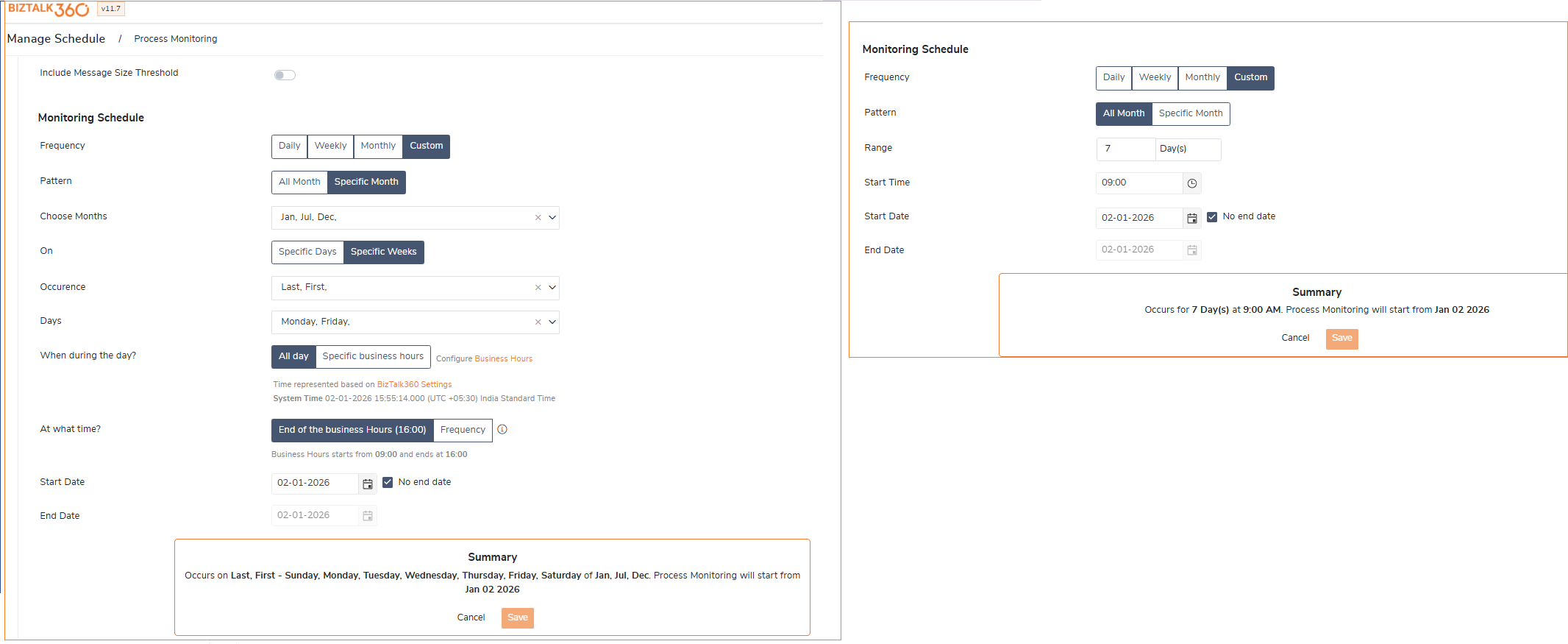
Process and Data Monitoring now support custom time-range scheduling, allowing users to configure execution on specific days of the month, selected weeks, or defined custom time durations.Which is now consistent with Receive Location scheduling defined in the Admin Console.
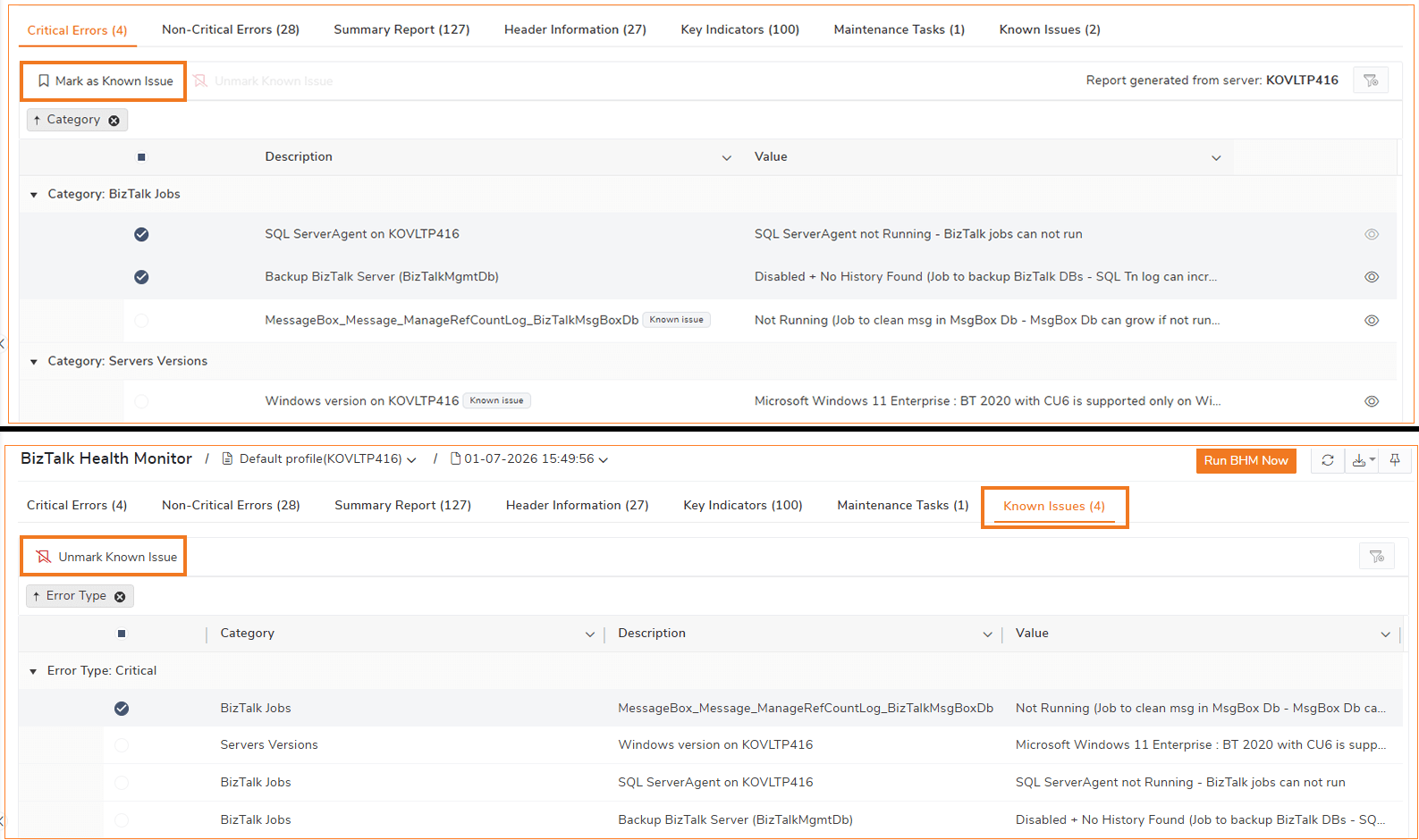
BizTalk Health Monitor- Known Issues
For recurring known cases, users can now mark them as ‘Known Issue’. This allows such issues to be automatically excluded from threshold monitoring and prevents repeated alert notifications, helping reduce alert noise and focus only on new or critical problems.
.
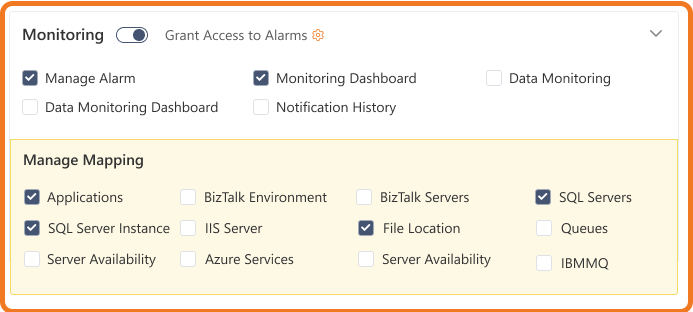
Role-Based control - Enhanced BizTalk360 role based access control to allow users to access the monitoring features based on the roles , such as BizTalk Administrators, SQL Administrators or Operators.This ensures users can view and manage only specific monitoring features relevant to their assigned roles .
User Access Profiles: Introduced import and export capabilities for User Access Profiles, which enables easy backup , resue and consisten configuration across environment.
 Enhancements
Administration
Automated Tasks: Added support for specifying a PowerShell script file path, enabling centralized script reuse across BizTalk360 and external tools such as Azure DevOps, in addition to direct script execution.
Auditing Enhancements: Enhanced auditing to capture alarm names in AutoCorrect audits, service instance details, and automated task names in Automated Action audits for improved traceability.
Custom Widget Scripts: Moved custom widget scripts to the database instead of the installation folder, preventing script loss in load-balanced environments and during server migrations.
BAM Related Activity Preview: Enabled previewing the content of related BAM activities before downloading the associated documents.
Search Artifact Filter Operators: Extended Search Artifact filtering capabilities by adding Not Equal and Contains operators for more precise result.
Advanced Event Viewer Filters: Added support for specifying multiple values within a single filter for applicable columns.
Knowledge Base Editor: Enhanced the Knowledge Base article editor to support larger content areas and improved formatting options for error descriptions.
Monitoring
Default Alarm in Monitoring Dashboard: Added the ability to set a default alarm in the Monitoring Dashboard based on individual user preferences, similar to the Administration dashboard.
ESB Data Monitoring Filters: Introduced the Contains operator for the Service Name filter in ESB Data Monitoring, with support also extended to the Administration section.
Azure Service Bus Topics Monitoring: Enhanced Azure Service Bus Topics monitoring by adding additional metrics such as Throttling Requests, Completed Messages, and related throughput indicators.
IBM MQ Monitoring Improvements: Improved IBM MQ monitoring by adding a Usage column and resolving access issues when queues have active open connections.
SQL Server Cluster Configuration: Enhanced support for SQL Server Cluster and Always On setups by providing clearer guidance for adding Always On nodes, ensuring smoother and more accurate configuration.
AutoCorrect Failure Alerts: Updated AutoCorrect alerting behavior so failure notifications are triggered only after all configured AutoCorrect retry attempts are exhausted.
ChatGPT saidAutoCorrect Failure Alerts: Updated AutoCorrect alerting behavior so failure notifications are triggered only after all configured AutoCorrect retry attempts are exhausted.
Analytics
Clone the Analytics Dashboard: Added the ability to clone an Analytics Dashboard along with its widget configuration, including an option to copy custom widgets to a preferred dashboard.
General
BizTalk360 Accessibility Improvements: Improved error messaging by providing precise notifications for issues like database connectivity problems , IIS features avaibility, missing user permissions etc.
Unified Schedule Maintenance : Introduced a common maintenance schedule across all environments and added system maintenance status visibility on the landing page.
.png) Bug fixes
Bug fixes
The following issues have been addressed in this release:
Administration
Resolved an issue where the Receive Port status was displayed incorrectly when multiple Receive Locations were configured in the Application section.
Fixed the Tracked Message Events to correctly display promoted properties.
Set the Service Name as default column and allow other columns as optional in Tracking Queries.
Addressed the access-related exceptions in Tracking Queries for non-super users.
Standardized the layout and widgets in the Administration dashboard for consistent experience.
Monitoring
Restricted SQL exception details from being exposed to business users in Data Monitoring.
Fixed the errors caused by temporary disk storage mapping in monitoring.
Resolved issue where down alerts were not sent via PagerDuty due to null reference exceptions.
Corrected the behavior to allow monitoring service instances from 0 in Service Instance Monitoring.
General
Improved BizTalk360 Home page load time, reducing the delay for the scenarios when large set of Host Instances.
Corrected the incorrect password validity status of the BizTalk360 service account.
Fixed the GetBizTalk360HealthStatus API to prevent unnecessary user authentication prompts.
Resolved an Import/Export issue where dashboards sharing the same name across Analytics, EDI, and BAM categories were overwriting dashboards in other categories.