Release Date: 18th August 2025 .png)
BizTalk360 Version 11.5 – Release Highlights
Technology Stack: Upgraded the BizTalk360 client package to the latest stable versions, including Angular 19.2.X, Kendo UI, and GoJS. These updates ensure improved performance, security, and long-term support for the product.
Modernized User Interface: Introduced a refreshed visual experience with updated styles and enhanced navigation. Improved scrolling behavior and layout consistency across modules. Offers a more intuitive and streamlined user experience.
Enhanced Feature Discoverability: Reorganized the interface to present related functionalities in a more structured manner, making it easier for users to locate and interact with core capabilities efficiently.
Automated Tasks Relocation: The Automated Tasks feature has been moved from the Environment Settings section to the Administration for better contextual relevance and streamlined management.
General Settings Accessibility: General settings are now easily accessible from the top navigation bar, enabling quicker access to configuration options.
Dependency Updates for BizTalk Reporting : For the smooth functioning of Reporting feature, update the following depedencies files;
Chromium Browser is upgraded to version 124.0.6367.201 in order to ensure enhanced compatibility and performance.
Playwright (v1.52.0.0) integrated as a new dependency to support reliable and automated browser-based operations for report generation.
 Enhancements
Administration
BizTalk Environment Topology
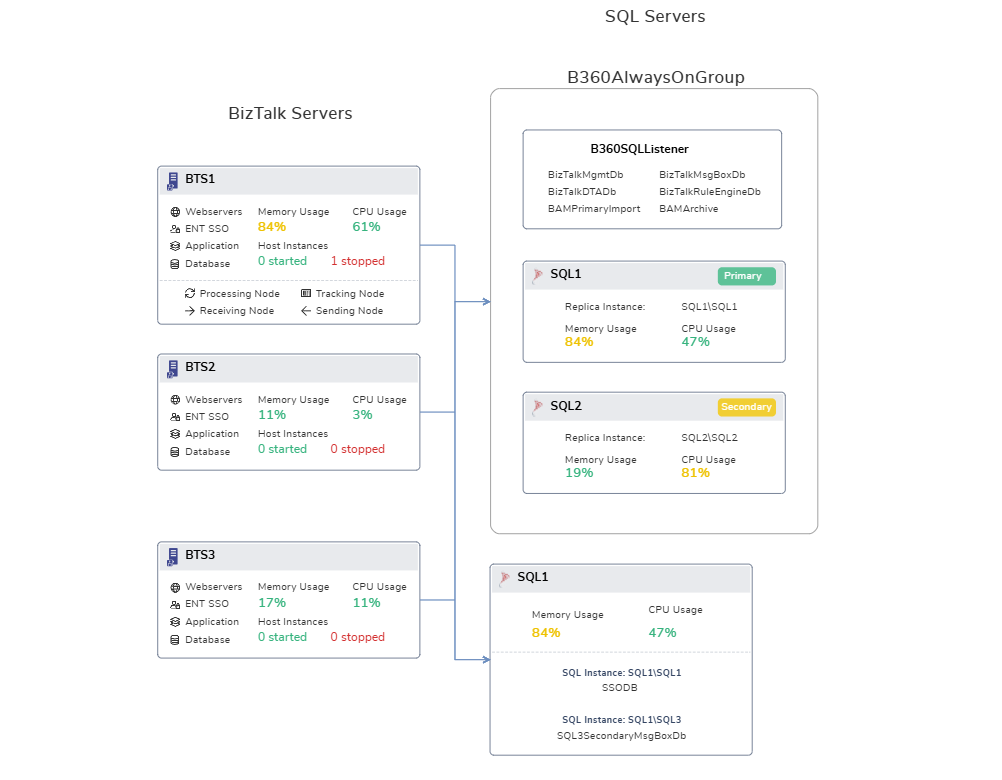
Updated the environment architecture diagram to include SQL Server Always On configuration, making high availability setup more transparent to understand.
Enhanced Automated Tasks (Custom Workflow UI/UX)
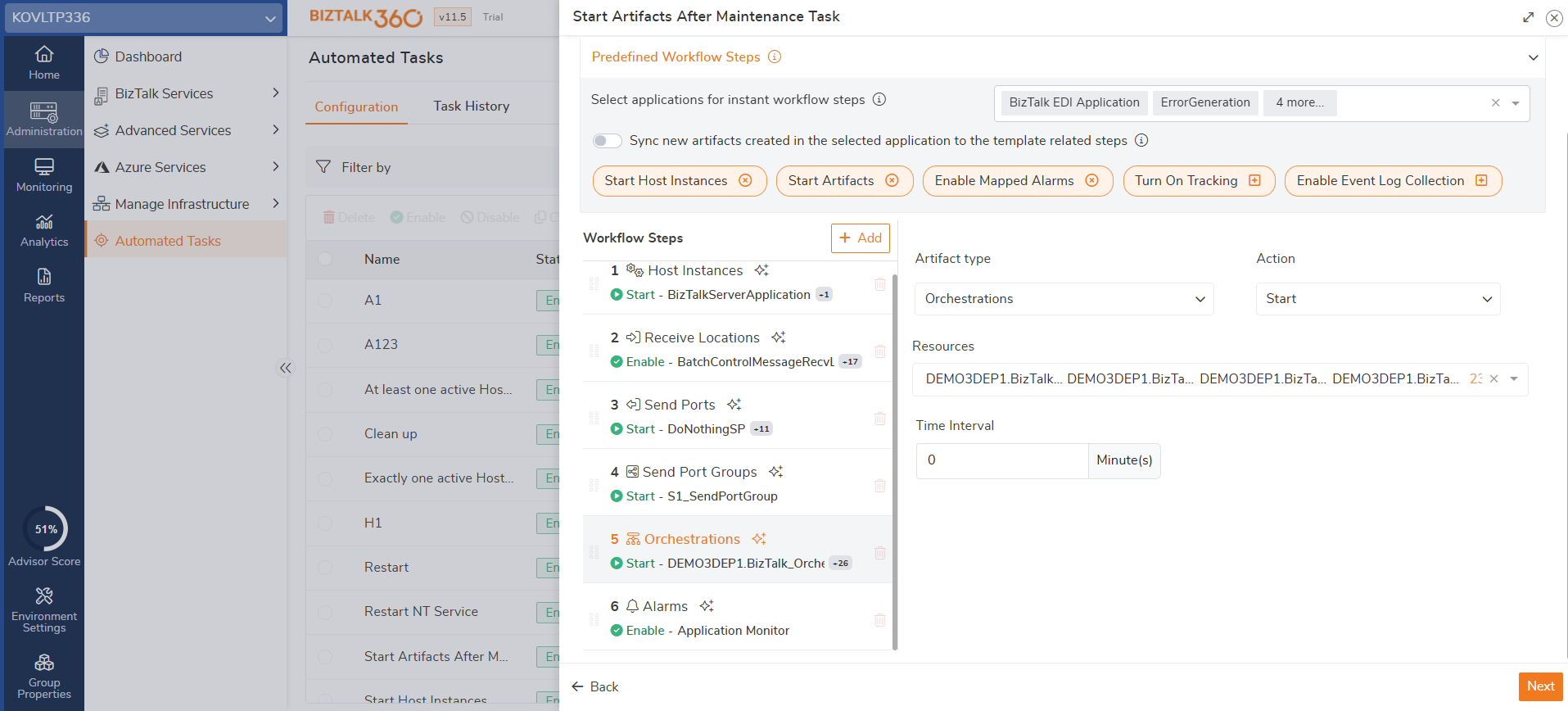
Improved the user interface and experience of the Custom Workflow in Automated Tasks by introducing step validation, ensuring a more intuitive and streamlined configuration process.
Handled the scenario for clustered host instances by supporting operations when the host instance is in a stopped state.
Monitoring
Streamlined Alarm Configuration
Enhanced navigation across Threshold Settings, Data Monitoring, and Health Configuration sections, enabling more intuitive and efficient alarm configuration experience. The system now analyzes existing alarm configurations and displays visual indicators for any pre-configured conditions.
Cluster Disk Monitoring
The system now identifies Cluster Disks and displays the associated cluster path within the configuration, providing better visibility and easier setup for monitoring clustered environments.
Application Mapping
Alarm mapping is now dynamic and context-aware. When an application is selected, the system automatically displays the mapped alarm at the top of the list, making it easier for the user to identify and map the artifacts.
Certificate Monitoring
The certificate listing pages now include a "Friendly Name" column, allowing users to easily identify certificates using user-defined names.
DataMonitoring Schedule Parellel Execution
Users can now configure the number of parallel executions for Data Monitoring schedules,which provides better control over system resource usage .
Message Box Data Monitoring
1.Query Filter
Message Box Data Monitoring is enhanced to add multiple Error Description . The "Contains" operator now supports multi-selection, allowing user to include multiple error descriptions in one go.
Added "Does Not Contain" operator, enabling you to exclude specific error messages from results.
2.Automated Action
With automated actions, the system performs service instance operations such as suspend, resume, or terminate. Users can now control how many instances the system can take action by configuring a limit in the system settings.
Monitoring Service Auto Restart
A system notification will now be triggered to the Admin whenever the Monitoring Service auto-restarts, helping to quickly identify service interruptions.
Start, Stop, and Restart actions of the Monitoring Service are now captured in the Governance and Audit section for improved traceability and operational accountability.
In high availability scenarios, users can configure a preferred Active Monitoring Server . The system ensures the selected server active at all times.
Database Maintenance
Introduced Execution History: Users can now view a detailed log of index rebuild and reorganization activities, including before and after execution metrics.
The system now displays the last execution time, offering better visibility into maintenance schedules.
Users can define Fragmentation and Page Count thresholds using AND/OR logic.
added support to define Fragmentation and Page Count thresholds using AND or OR logic
Support for multiple daily schedules enables more flexible and efficient index maintenance execution.
Optimized processing for fast-growing index tables, improving performance and efficiency.
Import/Export
The new step “Select Features” enables users to import only the required features.
Additionally, features are grouped by their respective modules in the Import Configuration, offering improved clarity during selection.
.png) Bug fixes
Bug fixes
The following issues have been addressed in this release:
Administration
Restored the missing "Error Description" column in Administration > BizTalk Services > Tracking Queries. The column now displays correctly
Fixed the multi-part message content view in Suspended Messages and Tracking Instances, ensuring all message parts are rendered properly.
Resolved syntax errors caused by BAM column names containing spaces, preventing exceptions during execution.
Fixed an issue where the Order By selection was not retained in saved BAM queries.
Resolved an exception that occurred when a non-super user attempted to save the Time Zone setting in BAM.
Handled scenarios where the BHM Tools directory was missing, ensuring accurate logging in BizTalk360.
Fixed an issue in Export to Excel where the Transport Type was missing while exporting Send Port details from Search Artifacts.
Handled null recurrence schedule values for Receive Locations, preventing object reference errors while reading results from SQL queries.
Resolved an issue where BRE returned incorrect rules when a class member and an XML type were used in combination within a rule.
Monitoring
Resolved an issue where SMTP channels configured to "Send only Errors & Warnings" occasionally failed to send notifications.
Fixed false alarms caused by outdated threshold type mappings that remained in the database after removal.
Addressed a scenario where unmapped artifacts with Auto-Correct did not work correctly if a different alarm with Auto-Correct was enabled.
Updated the PowerShell Notification Channel to set the execution policy at the process level.
Fixed an issue where age-based monitoring for Deadletter and Transferred Deadletter messages was not retriving the actual count as expected.
General
Anonymous user restrictions for UploadFile and ValidateNotificationChannel APIs are now enforced. Only Super Users can access these APIs.
Fixed an issue where dashboard import/export failed when the configuration included NT Group Users.
Resolved a serialization exception that appeared in logs while fetching recommendations from Analytics Custom Widgets.
Fixed a scenario where Automated Tasks attempted to restart stopped Host Instances, causing failure. The system now skips restart actions for stopped artifacts and informs users accordingly.