The BizTalk360 database can be treated like a standard SQL Server database. You can choose the appropriate backup strategy and recovery model based on your organization's requirements.
It is also acceptable to include the BizTalk360 database backup as part of your existing BizTalk Server backup strategy.
Steps to Back Up the BizTalk360 Database
You can take a backup of the BizTalk360 database using SQL Server Management Studio (SSMS).
Open SQL Server Management Studio and connect to the SQL Server instance hosting the BizTalk360 database.
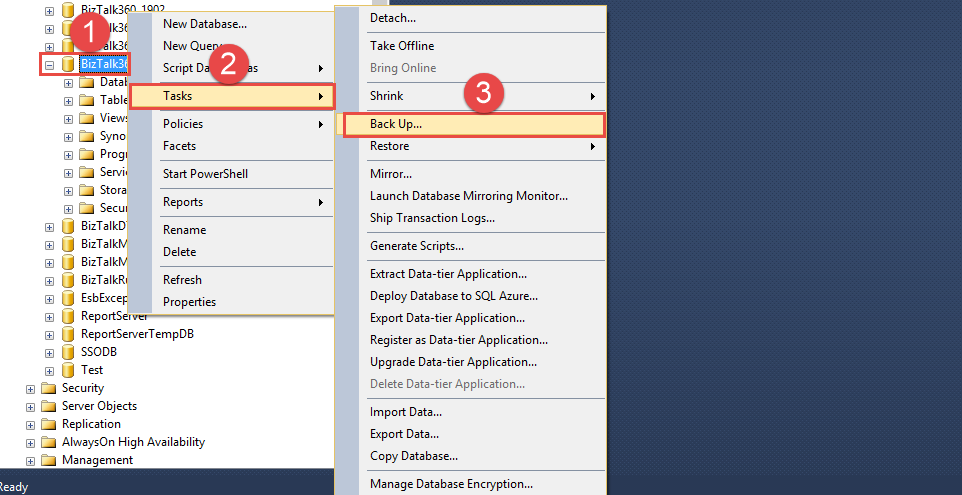
Locate the BizTalk360 database in Object Explorer.
Right-click the BizTalk360 database and select Tasks → Back Up.
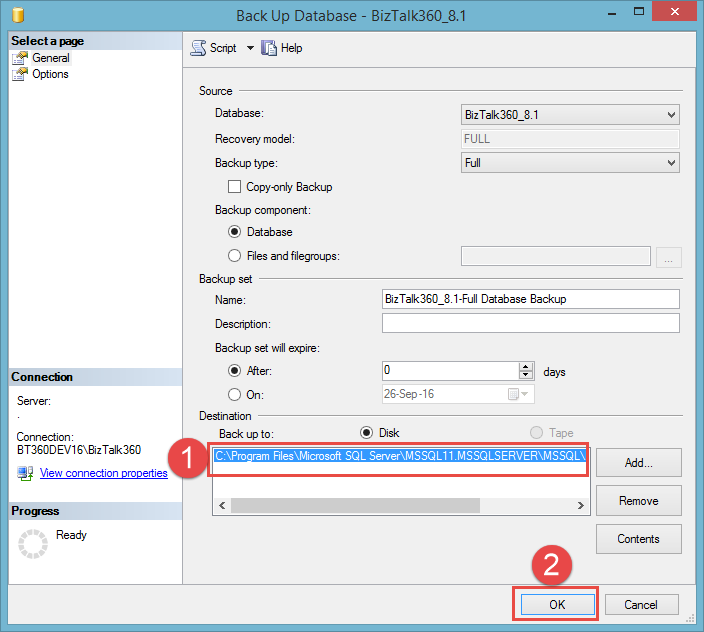
In the Back Up Database window, configure the required backup options.
Under Destination, specify the location where you want to store the backup file.
Click OK to start the backup.
Once the backup completes successfully, the BizTalk360 database backup file will be available at the configured destination.
Note: Make sure the SQL Server service account has the required permissions to write to the selected backup destination.