Release Date: 9th July 2026
 New features
IIS Log Monitoring
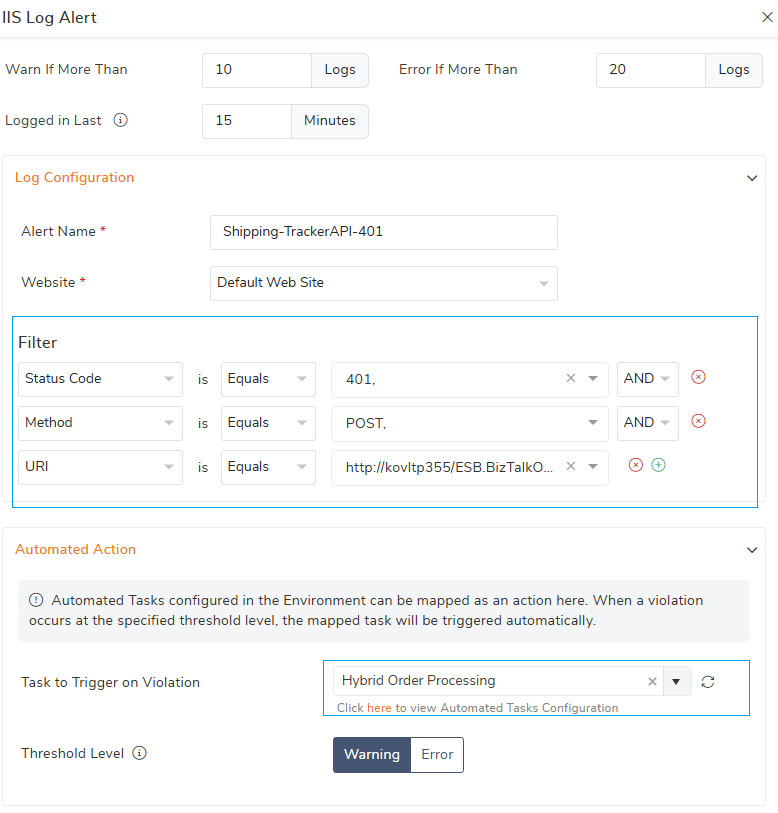
Administrators can now proactively monitor IIS logs and stay ahead of critical API and application issues with the new IIS Log Monitoring capability. This feature helps detect recurring errors, unusual traffic patterns, and API failures before they impact business operations.
Monitor specific IIS log entries : Configure alerts based on filters such as Status Code, HTTP Method, URI and Client IP to closely track specific API calls and application behavior.
Trigger automated actions: Monitor specific IIS log entries: When a threshold violation occurs, BizTalk360 can automatically trigger a mapped Automated Task, helping teams respond without manual intervention.
BHM Custom Schedule Options
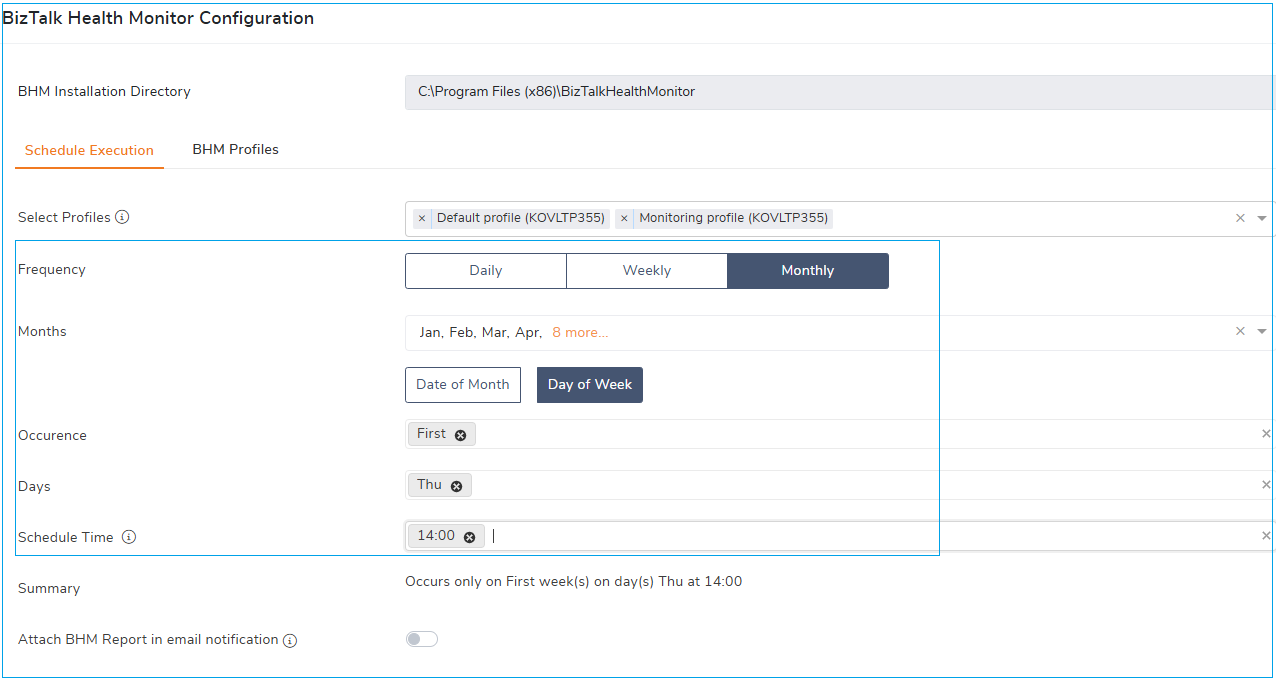
The BHM Schedule configuration has been enhanced to provide greater flexibility, allowing administrators to schedule BHM profile execution on Daily, Weekly, or Monthly frequencies with advanced recurrence option
Define custom schedules for BHM report generation to align reporting frequency with your operational needs.
Schedule reports at flexible intervals, such as every alternate week (2 weeks), to minimize false positives and surface more meaningful insights.
Process Monitoring Custom Message
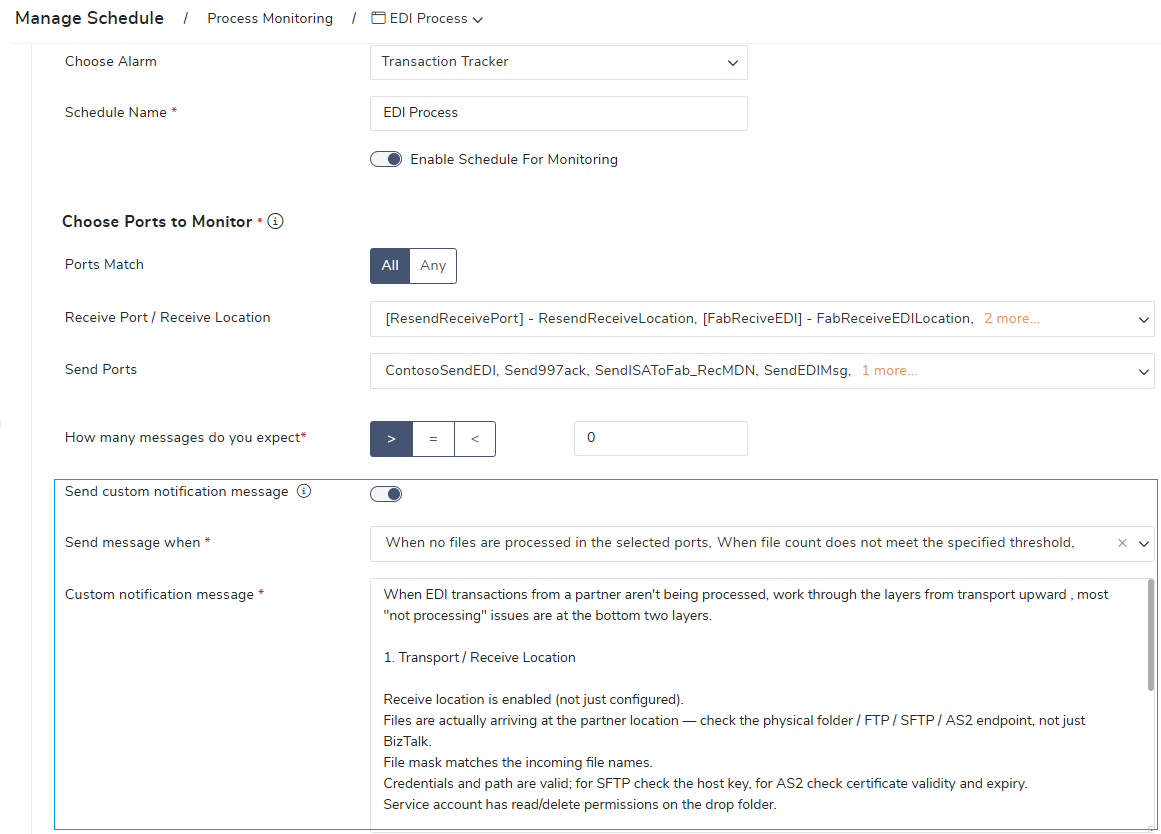
Strengthen the process monitoring notifications with custom messaging capability. When message processing in the monitored ports does not meet the expected rule, users can now receive tailored notifications with business-friendly messages, enabling faster understanding of the issue and quicker corrective actions without requiring deep technical knowledge.
 Enhancements
Administration
BHM Task Manual Trigger : A manual trigger option has been introduced for BHM Maintenance Recommendations, allowing administrators to review and validate the recommended maintenance actions before executing them. This provides greater control and prevents unintended changes in production environments.
Adapter Properties Export : The BizTalk Send/Receive Port Export feature has been enhanced to include the associated adapter properties when exporting artifacts. This improves the visibility and portability of BizTalk configurations, making it easier to migrate, document, and review integration settings.
Optimized IIS Log Collection : IIS Log Collection has been optimized to collect only relevant log entries instead of capturing all IIS logs. Administrators can now filter logs by status code, website, and endpoint (URI), reducing storage requirements
BHM Maintenance Task Execution across multiple SQL Instances: Enhanced authentication support for multiple SQL Server instances, enabling smoother BHM maintenance tasks across BizTalk database instances.
Monitoring
Monitoring Dashboard & BizTalk Group Dashboard Permissions: Strengthen security with enhanced role-based access control for the Monitoring Dashboard and BizTalk Group Dashboard. Users can continue to view the health status information displayed on the dashboards; however, navigation to the underlying features is restricted based on their assigned permissions.
API Security
Enhanced API Security: Strengthened application security with CSRF protection across the application, reducing the risk of malicious requests.
Sensitive Data Protection: Enhanced protection of sensitive fields in SFTP, FTP, API Apps, and Web Endpoint monitoring to improve the security of stored credentials and configuration data.
.png) Bug fixes
Bug fixes
The following issues have been addressed in this release:
Administration
Automated Tasks Not Triggering on new Threshold Violations: Fixed an issue where Automated Tasks were not triggered for subsequent threshold violations. Automated Tasks are now executed whenever a new threshold violation occurs.
Automated Tasks Manual Trigger: Handled the API Authentication failure when service account is not added as Super User.
ESB Exception Management – Dynamic Columns: Fixed NULL handling for Boolean columns. NULL values are now displayed as 'NULL' and can be filtered using the ISNULL operator.
Application Artifact Export : Resolved a UI issue where the Export option was incorrectly disabled. The Export option is now enabled whenever at least one supported artifact (Receive Location, Receive Port, Send Port, or Orchestration) is present.
Nested NT Group Service Account (BizTalk/SQL Servers): Fixed an issue in Identifying service account permissions inherited through nested Active Directory group memberships.
Monitoring
BizTalk360 Monitoring Service – Auto-Restart Delay : Fixed an issue where the Auto-Restart task could be delayed or skipped if the BizTalk360 application pool became idle or inactive. Now the monitoring service trigger API call to active the app pool that helps auto-restart kick starts as per schedule.
Analytics
Resolved an exception that occurred while retrieving the service status in the Analytics service.
General
Add Environment: Improved the MessageBox DB availability check while adding a new environment. The validation now correctly handles scenarios where, The SQL Server alias is not registered on the BizTalk360 server , The MessageBox database is unreachable ,The configured service account does not have sufficient permissions to access the MessageBox database.