Release Date: 20th April 2026 .png)
Important updates
Monitoring and Analytics Services - 64 Bit Support
The monitoring and analytics services now run as 64-bit processes which deliver the improved performance, higher throughput, and better resource utilization.
Reporting
The reporting feature rendering engine is replaced with Playwright for clearer and more reliable report generation.
Note: Report generation using SelectPDF has been deprecated. Users are strongly recommended to upgrade to v11.8 to continue generating reports without issues.
 New features
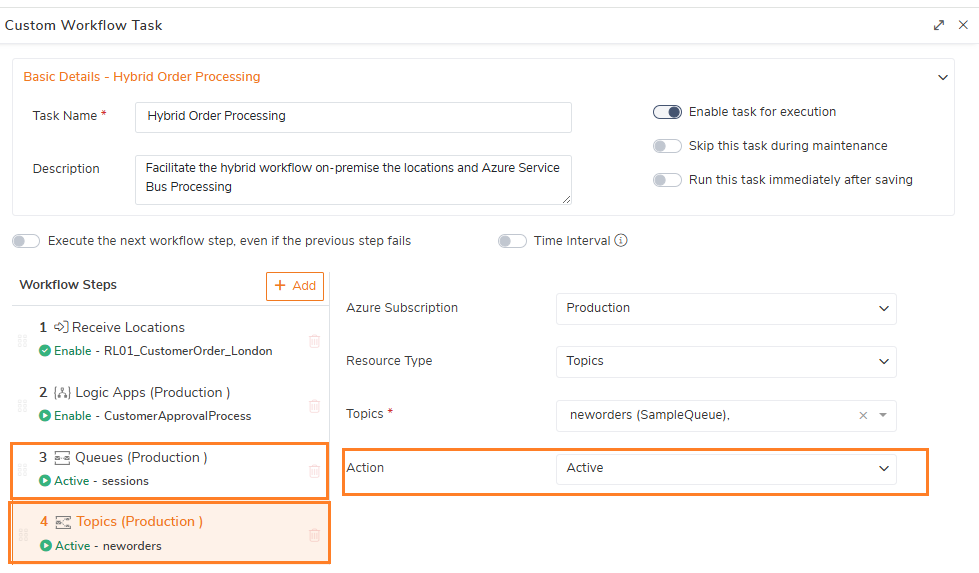
Azure Service Bus Automated Tasks
Introduced Azure Service Bus Queues and Topics Automated Tasks to manage entity states through scheduled execution, enabling proactive control and reducing manual intervention.
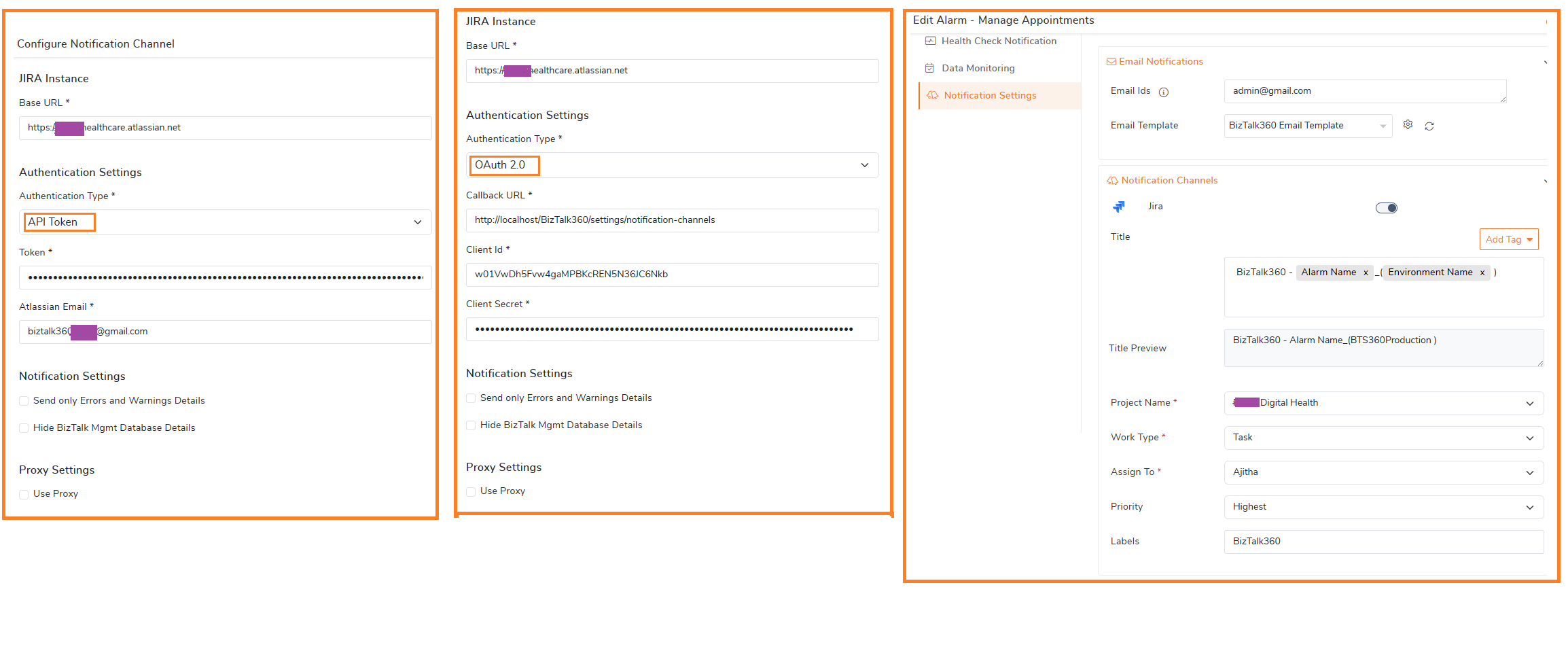
JIRA Notification Channel
Introduced a JIRA notification channel to automatically create work items from alarm notifications, with support for multiple authentication methods including API Token and OAuth.
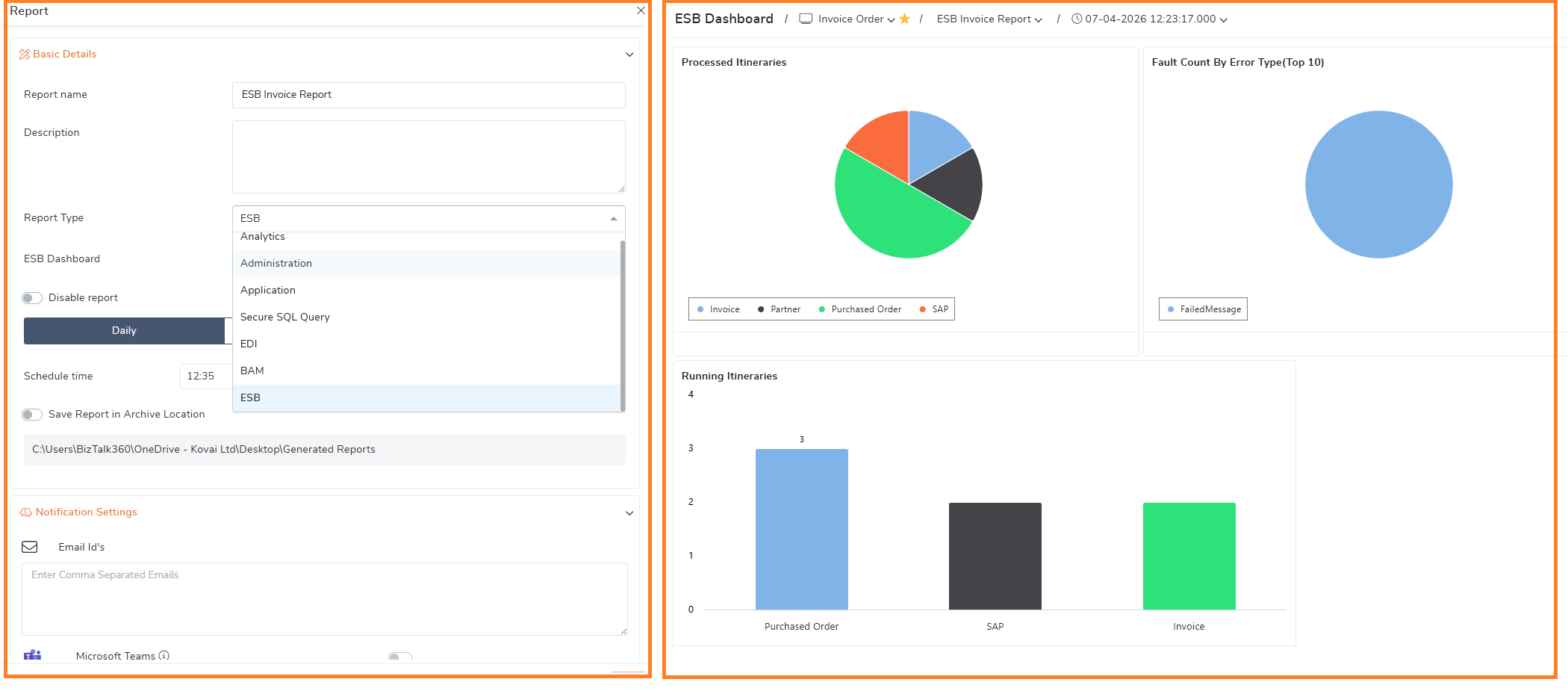
ESB and Administration Dashboard in Reporting
The business users can now take advantage by including the Administration Dashboard and ESB Dashboard in reports for improved visibility into operations and ESB activities for business users.
 Enhancements
Monitoring
File Location Monitoring Configuration
Introduced a generic threshold configuration for Folder, FTP, and SFTP locations, enabling consistent and flexible monitoring across all supported sources.
nSoftware SFTP support to SHA-2
Added support for SHA-2–based authentication in nSoftware SFTP location monitoring, enhancing security and ensuring compatibility with modern encryption standards.
Monitoring Service Improvements
a. Optimized memory consumption during data serialization and Windows registry access to improve efficiency.
b. Introduced flexible scheduling options with day-wise selection for automatic restart configuration of the Monitoring Service.
Email Notification Customization
Added an option to hide BizTalk SQL Server instance and database details in email notifications based on user preference.
Monitoring Notifications
Included the threshold violation date and time in Errors & Warnings notifications to provide better context and traceability.
Direct Navigation from Monitoring to Administration
Enabled direct navigation from the Monitoring section to the corresponding artifacts in the Administration section. This allows users to quickly access and take action on issues identified during monitoring.
General
Azure Permissions Improvements
i. Enhanced synchronization to improve performance when retrieving the service principal permissions.
ii. Added warning messages to highlight missing service principal permissions required for managing Azure resources.
iii. Improved role filtering by automatically handling cases where the service principal has elevated permissions such as Owner or Contributor.
BizTalk360 Log Acknowledgement
Enhanced Advisor Score calculation by introducing a log acknowledgment feature. Users can mark known issues as Acknowledged, and these logs are excluded from Advisor Score and BizTalk360 Health Status calculations.
License Activation
Enhanced license management to handle previously deactivated licenses, allowing users to remove and reactivate licenses directly within BizTalk360.
.png) Bug fixes
Bug fixes
The following issues have been addressed in this release:
Administration
Message Box Content: Enhanced support for viewing message content in high-availability BizTalk360 environments where BizTalk Server instances are deployed across different locations.
Application Business Rules: Fixed an issue where Application Business Rule Policies failed to load under the custom license.
Monitoring
Alarm Notification: Resolved a null reference issue that could occur while generating email notifications from the alarm email template, ensuring more reliable and consistent alert delivery.
Data monitoring Schedules:
i. Improved the accuracy of data monitoring schedule and overall status by replacing the misleading “Error” status with “Critical” for relevant scenarios.
ii. Additionally, addressed an issue where Task Action results were not being displayed for Message Box data monitoring, providing better visibility into execution outcomes.
General
API Documentation: Updated the API documentation to reflect the latest request payload structure for the Alert Maintenance API methods.
BHM and IIS Server Configuration: Resolved an exception occurring in Environment Settings during BHM profile and IIS server configuration.
Monitoring Health Status: Fixed an issue where the health status of monitoring service was not displayed correctly.
Monitoring Statistics: Corrected the inconsistencies in the monitoring statistics displayed on the BizTalk Environment Overview (Home) page.
Landing Page: Fixed an issue where alarm statistics, including alarm count and status, were not displayed correctly in the Environment Details card on the landing page.
Email Template: Fixed an issue where alert notifications failed to trigger after migration from older versions due to a newly introduced property in the email template.